Tuesday, 30 November 2021

OTBI: How to hide a section in the OTBI dashboard.

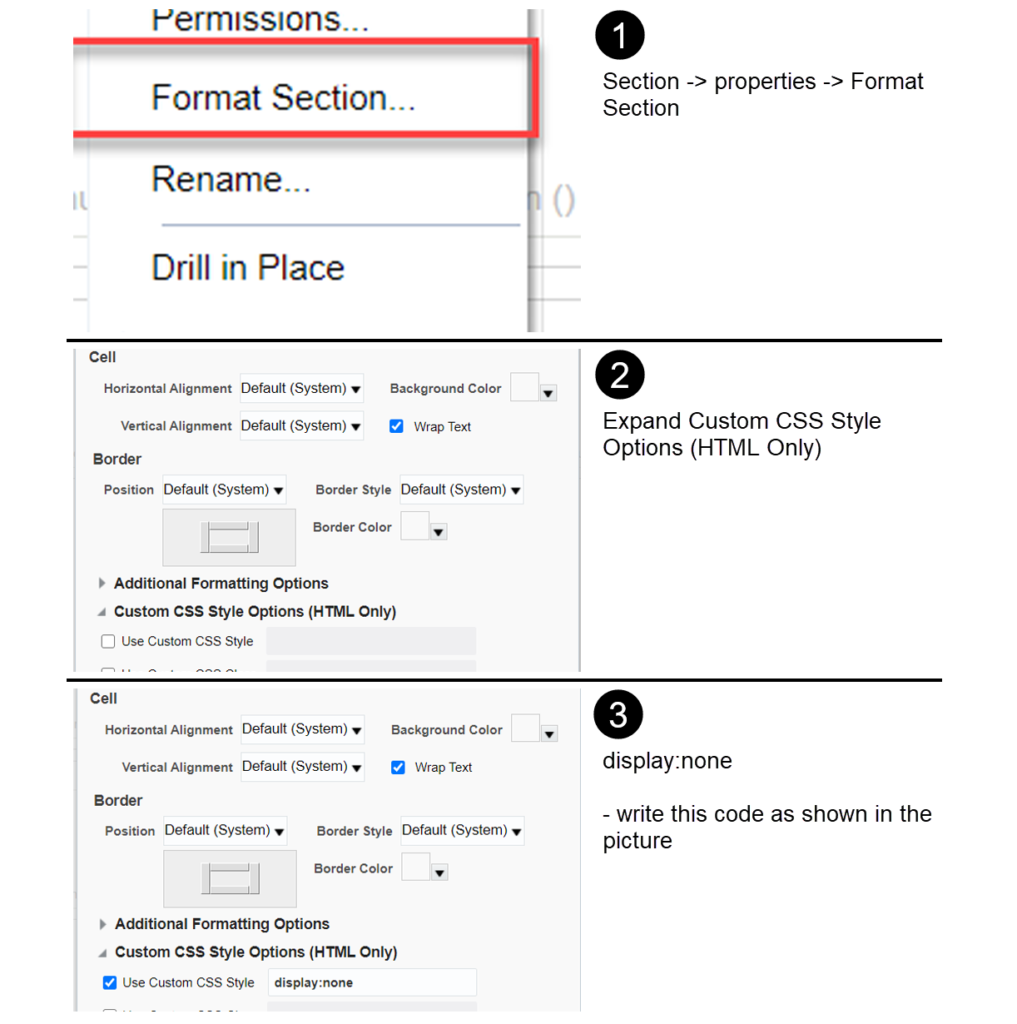
Select a section you want to hide

Go to format section -> expand Additional custom CSS style and Write dispaly:none
OTBI: Dashboard Auto-Refresh

OTBI dashboard shows a run time snapshot of data from the cloud, which becomes stale after some time When the users create/update data in Oracle HCM Cloud. To update the dashboard user should always refresh manually.


The below simple method will help the dashboard to auto-refresh for every 1 minute. 

1.       Add a separate Section with Text in all dashboard pages to have them refreshed, every 60 seconds (upon business need you to change the time interval)


           <META HTTP-EQUIV = "REFRESH" CONTENT = "60">


Saturday, 27 November 2021

How to execute the PLSQL in Oracle cloud HCM


Navigation: Reports and Analytics Ã  New Ã  Data Model Ã  Create a new Data set

Name: PLSQL (we can give any name)
Data Source: ApplicationDB_HCM
Type of SQL: Procedure Call
SQL Query:
DECLARE
type sys_refcursor is REF CURSOR;
xdo_cursor  sys_refcursor;
l_InQuery varchar2(32000);
BEGIN
l_InQuery := :query1;
OPEN :xdo_cursor FOR l_InQuery;
END;


Create the parameters:
Here query1 and xdo_cursor are the parameters


Run the data set then we will get the data of the sql that we pass as a parameter.


Example2 :


DECLARE      
    type precursor is REF CURSOR;
       xdo_cursor refcursor;
    BEGIN
      OPEN :xdo_cursor FOR
       SELECT *
       FROM PER_ALL_PEOPLE_F PAPF
       WHERE PAPF.PERSON_NUMBER = :Parameter;
       COMMIT;
   END;